Why AI Apps Use ASGI—and How It Differs from WSGI
A simple comparison of WSGI and ASGI, using an AI agent that spends most of its time waiting for LLM APIs.
Table of contents
When you build an application with a large language model (LLM), many Python examples use FastAPI and Uvicorn. I also used this setup without asking why. I simply assumed that ASGI (Asynchronous Server Gateway Interface) was the usual choice for AI APIs in Python.
But I could not clearly explain why they used FastAPI and Uvicorn instead of Flask and Gunicorn. I could not even explain the difference between ASGI and WSGI (Web Server Gateway Interface). Saying “ASGI is faster because it is asynchronous” does not answer the question. A WSGI server can use more workers or threads, and an ASGI application can still block.
The more useful question is this: can the server work on other requests while one request waits for an external API? In this article, I will compare WSGI and ASGI by following requests through an AI agent that calls an LLM API.
AI Agents Spend a Lot of Time Waiting
A simplified AI agent request might look like this:
sequenceDiagram
    accTitle: A typical AI agent API request
    accDescr: The agent receives a user request, waits for a database, an LLM API, and a tool API in sequence, then returns the result
    participant U as User
    participant A as Agent API
    participant D as Database
    participant L as LLM API
    participant T as Tool API

    U->>A: Ask a question
    A->>D: Fetch conversation history
    Note over A,D: Waiting for I/O
    D-->>A: Conversation history
    A->>L: Request inference
    Note over A,L: Seconds or tens of seconds of I/O wait
    L-->>A: Tool call
    A->>T: Search or internal API
    Note over A,T: Waiting for I/O
    T-->>A: Tool result
    A->>L: Continue inference with the result
    Note over A,L: Seconds or tens of seconds of I/O wait
    L-->>A: Final answer
    A-->>U: Response
The agent may appear to be doing complex work, but the application server is not usually running the LLM itself. When the agent uses external LLM and search services, the Python process often spends much more time waiting for network responses than using the CPU.
So what happens when another request reaches the same server while the first one is waiting?
WSGI and ASGI Are Interface Specifications
First, let us separate several names that often appear together:
- Flask, Django, and FastAPI are web application frameworks.
- Gunicorn and Uvicorn are application servers that run those applications.
- WSGI and ASGI specify the interface between a server and a Python application.
Before comparing Gunicorn and Uvicorn, we need to see how each server communicates with an application.
WSGI Represents a Request as a Function Call
In the WSGI specification (PEP 3333), an application looks roughly like this:
def application(environ, start_response):
    method = environ["REQUEST_METHOD"]
    path = environ["PATH_INFO"]
    body = f"{method} {path}".encode()

    start_response(
        "200 OK",
        [
            ("Content-Type", "text/plain"),
            ("Content-Length", str(len(body))),
        ],
    )
    return [body]
The server puts the request data into a dictionary called environ, then calls the application. The dictionary contains the HTTP method, path, query string, headers, and wsgi.input, which the application can use to read the request body. The example uses REQUEST_METHOD and PATH_INFO to create a response body such as GET /example.
The application uses start_response to pass the HTTP status and response headers back to the server.
This model is simple and works well for applications that handle short HTTP requests synchronously. The response iterable can also yield multiple chunks, so WSGI supports HTTP streaming.
However, the interface is built around one HTTP request and response. While the response is in progress, WSGI has no standard way to keep sending events such as “the client sent another message” or “the connection was closed” to the application.
ASGI Exchanges Events over a Connection
In the ASGI specification, an application is an asynchronous function with three arguments:
async def application(scope, receive, send):
    if scope["type"] != "http":
        return

    method = scope["method"]
    path = scope["path"]
    request = await receive()
    request_body = request.get("body", b"")
    body = f"{method} {path}: {len(request_body)} bytes".encode()

    await send({
        "type": "http.response.start",
        "status": 200,
        "headers": [
            (b"content-type", b"text/plain"),
            (b"content-length", str(len(body)).encode()),
        ],
    })
    await send({
        "type": "http.response.body",
        "body": body,
})scopecontains information that does not change during the connection, such as its type, the HTTP method, and the path.receiveis a function for receiving events from the server.sendis a function for sending events to the server.
The example reads the HTTP method and path from scope, then extracts the body from an http.request event returned by receive(). In a real request, the body may be split across multiple events, so production code must keep receiving until more_body becomes False.
ASGI uses different events for different protocols. HTTP uses events such as http.request and http.response.body. A WebSocket uses events such as websocket.connect and websocket.receive. The ASGI HTTP and WebSocket specification defines the scopes and events for each connection type.
So the main difference is not only synchronous versus asynchronous code. WSGI represents one HTTP request as a function call. ASGI represents the communication during a connection as a series of events.
flowchart TB
    accTitle: Comparing the WSGI and ASGI communication models
    accDescr: WSGI returns a response from one function call, while ASGI exchanges events through receive and send for the lifetime of a connection

    subgraph W["WSGI: one request = one function call"]
        direction LR
        WS["Server"] -->|"environ and start_response"| WA["sync application"]
        WA -->|"response iterable"| WS
    end

    subgraph A["ASGI: one connection = events over time"]
        direction LR
        AS["Server"] -->|"receive()"| AA["async application"]
        AA -->|"send()"| AS
    end
What Happens When Five People Ask at Once?
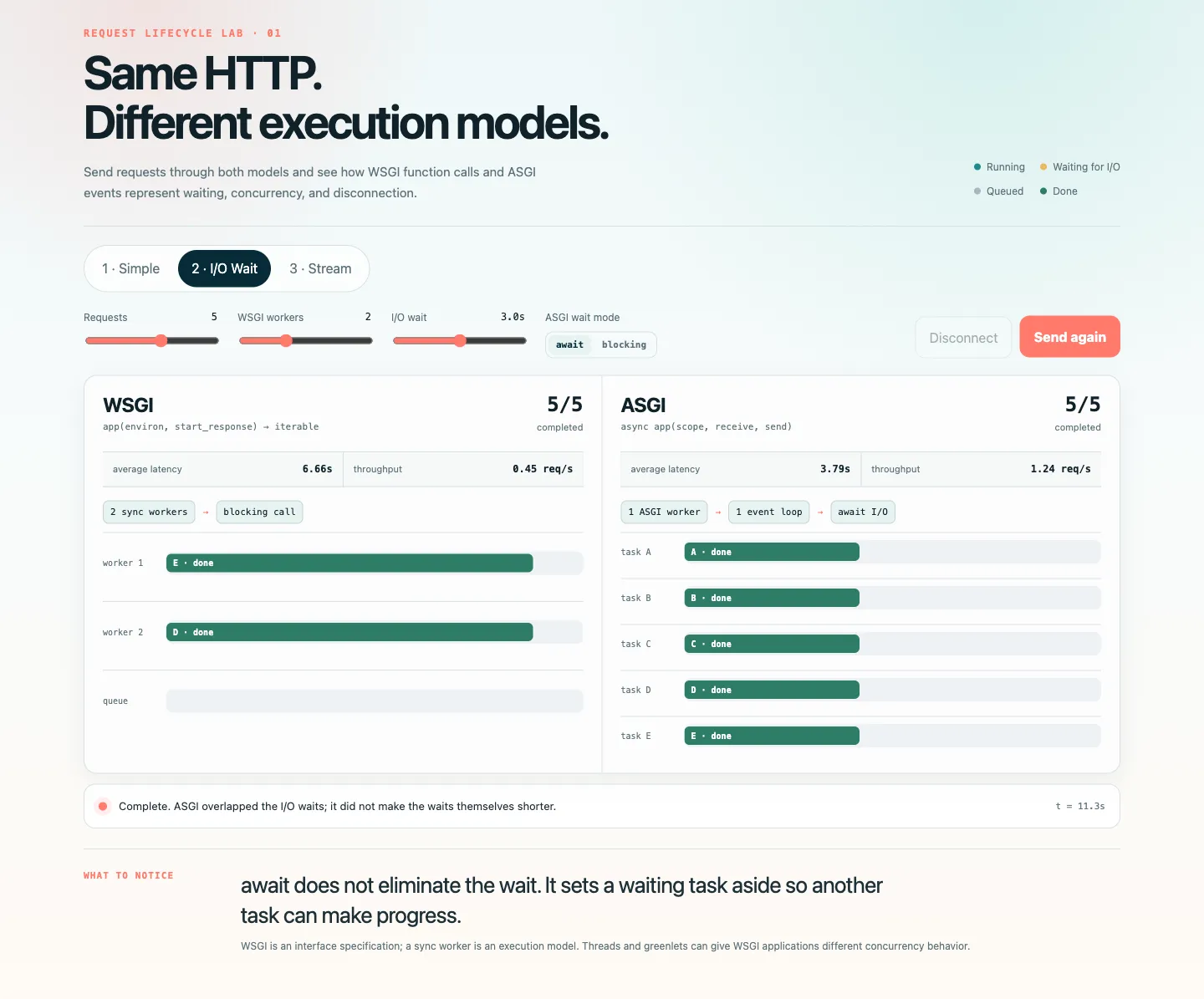
Consider an agent that waits three seconds for an LLM API during each request. What happens if five people send questions at nearly the same time?
The lab below starts with these settings:
- Requests: 5
- WSGI workers: 2
- I/O wait: 3 seconds
- ASGI mode: await
Select “2 · I/O Wait” and click “Send 5 requests.” Then switch the ASGI mode from await to blocking. Even though both versions use ASGI, their tasks progress very differently.
In the lab, average latency is the average time from the arrival of the five requests to the completion of each request. Throughput is the number of requests completed per simulated second. The ASGI side uses one worker and one event loop.
If the lab does not load, view a static screenshot
A WSGI Sync Worker Remains Occupied While Waiting
Gunicorn’s default sync worker processes one request at a time. With two workers and five requests, the first two requests occupy the workers while the other three wait for a free worker.
Requests A and B use almost no CPU while they wait. But their synchronous function calls have not returned, so the workers cannot start another request. Request C can start only after A or B finishes.
WSGI itself does not say “use one process per connection.” This behavior comes from running a WSGI application with sync workers. Gunicorn’s design documentation also explains that a sync worker handles one request at a time.
ASGI Can Set Aside a Waiting Task
On the ASGI side, suppose the LLM call looks like this:
async def run_agent():
    response = await async_llm_client.generate(...)
    return response
When the code reaches await, the current task tells the event loop that it must wait for the LLM API. The task then gives control back to the event loop. While it waits, the event loop can start B, C, D, and E.
flowchart LR
    accTitle: Yielding control to the event loop while awaiting I/O
    accDescr: Request A yields control while waiting for the LLM API, allowing the event loop to start requests B through E

    A1["Request A"] --> A2["await LLM"]
    A2 -. "yield control" .-> L["Event loop"]
    L --> B["Request B"]
    B --> C["Request C"]
    C --> D["Request D"]
    D --> E["Request E"]
    E -. "all tasks waiting for I/O" .-> R["Resume each task when its response arrives"]
ASGI has not reduced the LLM API’s three-second response time. It has simply overlapped several waits. When Python has nothing to do for one connection, it can work on another. This mainly improves throughput and reduces queues when many requests arrive together. It does not necessarily reduce the latency of one request.
async def Can Still Block
Switch the lab’s ASGI mode from await to blocking, and the behavior changes. One way to create this problem is to call a synchronous LLM client directly from an asynchronous function:
async def run_agent():
    response = sync_llm_client.generate(...)
    return response
While generate() waits synchronously for the network response, it does not give control back to the event loop. As a result, B, C, D, and E cannot run either.
sequenceDiagram
    accTitle: time.sleep blocks the event loop
    accDescr: While Task A runs time.sleep for three seconds, the same event loop cannot start Task B, Task C, or disconnection handling
    participant L as Event loop
    participant A as Task A
    participant B as Task B
    participant C as Task C

    L->>A: Start handler
    activate A
    Note over L,A: time.sleep(3)<br/>occupies the event loop
    A-->>L: Yield control after three seconds
    deactivate A
    L->>B: Finally start B
    L->>C: Finally start C
    Note over L,C: Disconnect handling also waits until now
Using async def or an ASGI server is not enough. The code that performs I/O—including LLM SDKs, HTTP clients, and database drivers—must also support non-blocking I/O.
If only a synchronous API is available, you can move the call to another thread with asyncio.to_thread() from asyncio. But this does not allow unlimited concurrency: the thread pool has a fixed size. CPU-heavy work can also block the event loop, so heavy image processing or local inference should usually run in another process or a job worker.
Does This Mean WSGI Cannot Run an AI App?
Of course it can. The comparison so far may make WSGI sound unable to handle requests concurrently. But that view mixes up WSGI itself with one type of worker: the sync worker.
It helps to separate the problem into three decisions:
- Interface specification: What can the server and application exchange? This is where WSGI and ASGI differ.
- Concurrency model: What can run while one operation waits? Web servers in general use processes, threads, greenlets, or coroutines. WSGI deployments commonly use the first three. Native coroutine-based concurrency across requests primarily belongs to ASGI.
- Communication protocol: How does the client exchange data with the server? Examples include HTTP, Server-Sent Events (SSE), and WebSocket.
For example, a gevent worker lets a WSGI application use greenlets. But the server and application still communicate through WSGI. Similarly, WsgiToAsgi translates between ASGI and WSGI at the boundary. It does not make the WSGI application asynchronous.
There are several ways to increase I/O concurrency in a WSGI application without migrating it to ASGI:
| Approach | What runs while another request waits | Impact on existing code | Caveat |
|---|---|---|---|
| Add worker processes | Process | Low | Each waiting request occupies a relatively heavy process |
Use gthread | OS thread | Low | Thread count and memory are finite |
Use gevent | Greenlet | Sometimes low | Check library compatibility and monkey patching |
| Run an async view through a WSGI framework | Coroutine within the current request | Medium | Can overlap I/O within that request, but the WSGI worker remains occupied |
Use WsgiToAsgi | Thread inside the adapter | Low | The application inside remains synchronous WSGI |
In addition to sync workers, Gunicorn provides the thread-based gthread worker and a gevent worker based on greenlets. If you need to keep a synchronous LLM SDK, a thread worker may be sufficient.
gevent switches to another greenlet when a compatible I/O operation starts waiting. It can also use monkey patching to replace standard-library modules such as socket with versions that work with gevent. However, the official gevent documentation warns that you need to check when patches are applied and whether your libraries are compatible. The important point is that gevent changes how a WSGI application waits, not how it represents communication. The WSGI interface still returns an HTTP response as an iterable; it does not gain ASGI’s receive and send functions.
An adapter such as asgiref.wsgi.WsgiToAsgi can run an existing WSGI application behind an ASGI server.
flowchart TB
    accTitle: Translating a request with WsgiToAsgi
    accDescr: WsgiToAsgi converts ASGI HTTP events into a WSGI environ, calls the synchronous WSGI application in a thread, and converts its response back into ASGI events

    S["ASGI server"]
    A1["ASGI HTTP events"]
    W["WsgiToAsgi adapter"]
    T["synchronous work in a thread"]
    APP["WSGI application"]
    R["response iterable"]
    A2["ASGI response events"]

    S --> A1 --> W --> T --> APP --> R --> W --> A2 --> S
This is useful during a gradual migration, when an existing WSGI application needs to run beside new ASGI endpoints. However, wrapping the application does not turn its synchronous functions into asynchronous ones. A WSGI function still cannot naturally use await or handle WebSockets. The ASGI specification’s section on WSGI compatibility also says that WSGI applications must run in a thread pool.
Why ASGI Is Still Common in AI Applications
WSGI offers several ways to handle I/O waits efficiently. Even so, ASGI is often a good choice for a new AI application because concurrency is only part of the story:
- You can directly
awaitasynchronous LLM and HTTP clients. - You can call several tool APIs concurrently.
- You can send a response in chunks.
- You can receive a disconnect event and cancel work that is no longer needed.
- You can extend the application to bidirectional protocols such as WebSocket.
- You can manage the creation and cleanup of a database connection pool with lifespan events.
With ASGI, an application can call send() several times with http.response.body and more_body=True, using await between calls. It can send each chunk as tokens arrive from the LLM. While it waits for more tokens, the same worker can handle other connections. WSGI can also stream HTTP through a response iterable.1 But the worker is often busy while it waits for the next value, and the application cannot receive client events through the same interface while it sends the response.
Disconnect handling matters because there is little value in continuing LLM generation, tool calls, and database queries after the user closes the page. For a long operation, cancellation can save both computing resources and API costs. With ASGI, the application can receive http.disconnect or websocket.disconnect through receive(), cancel related tasks, and release their resources.
Lifespan events let a server create a database connection pool once before it accepts requests, then close the pool during shutdown. This avoids creating new connections for every request. It also lets the server report an initialization error before it starts accepting traffic. Finally, it helps keep the pool and request handlers on the same event loop, instead of accidentally sharing connections across loops.
In short, AI applications spend a lot of time waiting for LLMs and tools. ASGI lets the server use that time to handle other connections. It also provides one model for streaming, disconnection, and cancellation. That is why ASGI and asyncio are a common combination in new AI applications.
Footnotes
-
Check this previous article for example. ↩